Discover the transformative power of AI for senior living, from boosting independence & personalizing care to revolutionizing marketing & operations in this insightful blog.
Continue reading

Discover the transformative power of AI for senior living, from boosting independence & personalizing care to revolutionizing marketing & operations in this insightful blog.
Continue reading
Discover powerful strategies for database reactivation to boost senior living sales. Learn how to leverage technology and personalization for higher occupancy rates.
Continue reading
Boost engagement and drive conversions with AI in senior living marketing strategies that humanize your brand and enhance customer service
Continue reading
In honor of National Technology Day, we’ve put together a list of apps we use that definitely make our work better and lives easier.
Quick note: All of these apps have free plans, but there are paid versions with additional features.
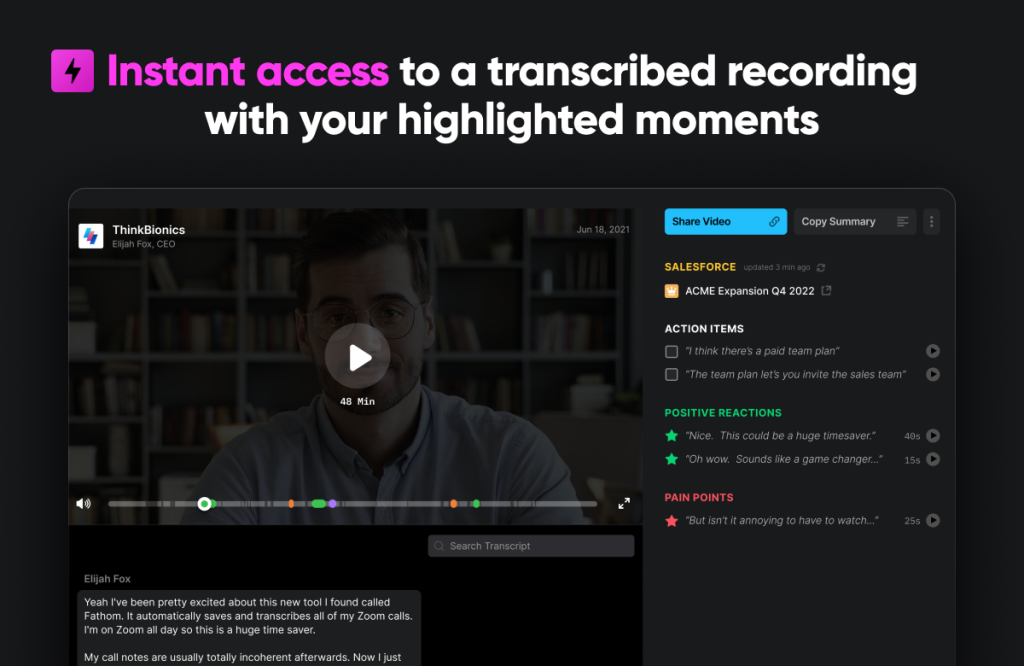
If you’ve been on a Zoom call with me over the last year, you’ve seen my Fathom notetaker. It’s also been my nerdy go-to conversation starter, “Do you use Fathom on Zoom?”
Before Fathom, taking notes during a Zoom call was messy and sharing a Zoom video was even more challenging. But with Fathom, all of that is extremely easy.
When you install Fathom and begin a Zoom meeting, you’ll notice that it will join your Zoom room as an additional user. Once you’ve added it to the Zoom room, you’ll have a Fathom navigator appear on your screen. The navigator allows you to mark specific timestamps and add notes in your meeting.
As soon as the meeting is over, the meeting recording is available in Fathom’s cloud with a full transcript (the whole thing is usually ready within two minutes — depending on the meeting length).
I could say a lot more. But if you use Zoom, you need to use Fathom.
Fathom is currently 100% free with no paid options.
Click here to visit Fathom.

I used to design a lot of collateral and images with programs like Adobe’s InDesign and Photoshop. But now that we have Canva, I’ve dropped both of those programs.
The amount of templates, free designs and icons, and basic image editing you can do in Canva is amazing.
If you ever design PowerPoint slides, basic logos or branding materials, social media posts, or just about anything else, you should check out Canva.
You can do a lot with Canva for free. But they do have a paid version that gives you access to additional features, templates, and icons.
Click here to visit Canva.
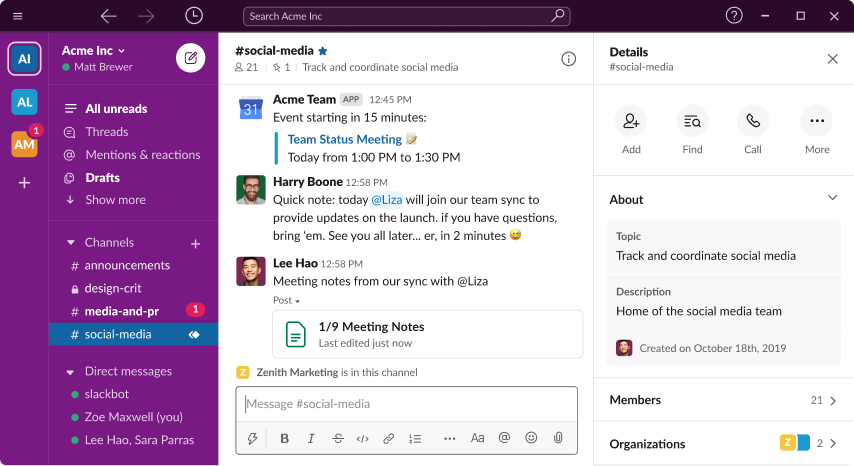
I can’t imagine what our team would do without a tool like Slack. Maybe we would email each other 85 times a day? Gross.
Slack is a great way to quickly stay in touch with your team throughout the day.
If you manage a team of marketing directors and sales people, Slack would be a great place for all of you to share ideas, solve challenges, and encourage each other without sending an email.
Slack is free but also offers a paid version.
Click here to check out Slack.

I used to put my daily tasks on paper, but I would often forget recurring tasks or leave my desk to work at a coffee shop and forget what I wrote down.
With ClickUp, I can view my tasks on my laptop, tablet, and phone. I can create recurring tasks, automate tasks through Zapier (that’s the next app I’m mentioning), and set a content calendar.
ClickUp is also a great way to stay accountable with a team or share a task with a team member.
ClickUp is free but also offers a paid version.
Click here to view ClickUp.

Have you ever wondered, “There has to be a really easy way to easily connect software and apps without having to know any kind of code.”
If so, Zapier or Make is your answer.
Zapier and Make essentially do the same thing, but we use both of them in our business because they each work with apps that the other doesn’t work with.
You can do things like:
The possibilities are endless.
They both offer free and paid versions.
Click here to view Zapier or click here to view Make.

If you enjoy attending conferences and taking notes on an iPad, you should download notability.
Notability offers the features of a typical note-taking app with the ability to record audio at the same time. It will timestamp your notes to line up with the audio. For example, if the speaker says something that you write down, when you go back and listen to the audio later and want to skip to the part when the speaker said that one thing, you can just click on the note you wrote and it will jump ahead to that section.
They simply call it: Audio-recording synced to your notes.
Notability offers a free and paid version.
Click here to view Notability.
We use a ton of software and apps, but these are a few of our favorites. If there is a big one we missed, you should let us know!

2023 is just days away and chances are you already have a solid 2023 marketing plan. But take a quick look at the list below to be sure these items are on your list:
If you don’t do anything else in 2023, do this.
Please get rid of the forms on your Schedule A Tour, Book A Visit, and Schedule A Visit pages. If you’re relying on your marketing directors to respond to inquiries after they submit a tour request form, you’re losing tours and move-ins.
You need to put an actual calendar on your website for users to choose a specific day and time. And that calendar should be synced to your marketing director’s calendar.
Once the lead confirms the tour, it is automatically added to your director’s calendar, and the lead should begin receiving reminder messages before the tour.
If you want something like this for your website, just contact us. We make it really easy to get this up and going.
It’s really sad that this is still a big problem in the senior living industry when it doesn’t have to be. We mystery shopped thousands of community websites this year, and here are a few of the disappointing highlights:
These numbers tell us that (1) we’re not serving families and their loved ones like we should and (2) we’re leaving thousands and millions of dollars on the table.
That’s the bad news. But there is good news. It doesn’t have to be this way, the solution is cheap, and it can be implemented overnight.
⚪ It doesn’t have to be this way.
The way many communities respond to new leads is the way they responded to new leads 20 years ago. But you and I both know the landscape has drastically changed so the way we did things 20 years ago will not work today.
You need to implement automation in your follow-up because good automation will follow-up at the right time every time. Humans will follow up whenever they can — which, for many busy sales people in your community, may honestly be 48 hours later (which is not good enough).
Before we go any further, I will acknowledge that the word automation might conjure up memories of frustrating chat bots you’ve used in the past. Some companies still use chat bots like that, but there is fantastic automation that is available. It’s personable, feels like a human, and won’t annoy your leads.
⚪ The solution is cheap.
Every website lead should be contacted in two minutes or less (because there is a lot of data that shows why this is important). And you may think something like that would be pricey. But it’s not.
Our tool that follows up with every lead in two minutes or less is $297 a month per community.
⚪ It can be implemented overnight.
I recently heard a leader in the senior living marketing and sales world say that they wanted to implement a good speed-to-lead solution but that it “couldn’t be implemented overnight.”
That’s not true.
We can put our tools on your website, and they’re ready to go. You can pay today, we give our tools to your web team, they put the tools on your website, and your speed-to-lead is fixed.
Not only did our mystery shops show us that speed-to-lead was bad, but the frequency of follow-up was terrible, and the messaging did not connect.
⚪ You need consistent follow-up
It’s one thing to follow-up fast; it’s another thing to do it consistently. The best way to be able to measure the effectiveness of your follow-up is to rely on automation to do it the exact same way every time. Then, a couple of months later, you can look at the results, tweak, set goals for the next couple of months. It’s impossible to know how effective your follow-up is if you’re doing it differently every time. Automation solves that problem.
⚪ You need to follow-up more
Our mystery shopping shows us that senior living communities don’t follow-up enough. During the first seven days, of the communities that did respond to our inquiries, we usually only received one follow-up message (text, email, and call included). That’s not nearly enough. Through the first seven days, you should aim for 4–5 touches.
⚪ Your follow-up messaging needs to connect
A lot of the messaging we’ve seen doesn’t do a good job of connecting with the problems that the spouse or adult child is dealing with. The responses to our inquiry are filled with industry jargon, way too many PDF attachments of brochures, and long paragraphs of text.
When we follow-up like that, we overwhelm people. What they really need is for someone to say, “This is Luke at Pine Greens. I just received a notice that you viewed our pricing. Can you tell me a little more about what led you to view our pricing today?”
We all know video is killing it these days so let’s do something about it!
When it comes to connecting with your leads, there are many great tools in the industry like OneDay, SalesMail, and others. These apps make it really easy to send personalized videos to leads. We received some in response to our inquiries, and they are impressive!
The next thing you need to put on your website is video testimonials from family members, residents, and team members. Before you start thinking about how difficult that may be too accomplish, I promise you it’s really easy. Just reach out to us to use our brand new video testimonial generation platform, or we can recommend some other options to you.
Here is what you need to do to help your marketers reach 100% occupancy in 2023
If you do those four things, you’ll find increased occupancy and happier sales people.